EasyShoppi Blog
RTX PRO 4000 Blackwell vs RTX PRO 5000 Blackwell: Which AI GPU Should You Buy in 2026?
Artificial Intelligence workloads are growing rapidly, and choosing the right GPU has become one of the most important decisions when building an AI workstation.
RTX PRO 4000 Blackwell vs RTX PRO 5000 Blackwell: Which AI GPU Should You Buy in 2026?
Artificial Intelligence workloads are growing rapidly, and choosing the right GPU has become one of the most important decisions when building an AI workstation.
NVIDIA's RTX PRO Blackwell series is designed specifically for AI development, machine learning, local large language models (LLMs), professional visualization and enterprise workloads.
Two of the most popular options are the RTX PRO 4000 Blackwell and the RTX PRO 5000 Blackwell. While both GPUs are built on NVIDIA's latest Blackwell architecture, they target different types of AI users.
In this guide, we'll compare both GPUs and help you decide which one is the better investment for your AI workstation in 2026.
RTX PRO 4000 Blackwell vs RTX PRO 5000 Blackwell Specifications
| Specification | RTX PRO 4000 Blackwell | RTX PRO 5000 Blackwell |
|---|---|---|
| Architecture | NVIDIA Blackwell | NVIDIA Blackwell |
| Memory | 24GB GDDR7 ECC | 48GB GDDR7 ECC |
| ECC Memory | Yes | Yes |
| PCIe Interface | PCIe Gen5 x16 | PCIe Gen5 x16 |
| Professional Drivers | Yes | Yes |
| Display Outputs | Yes | Yes |
| Target Users | AI Developers & Professionals | AI Teams & Enterprises |
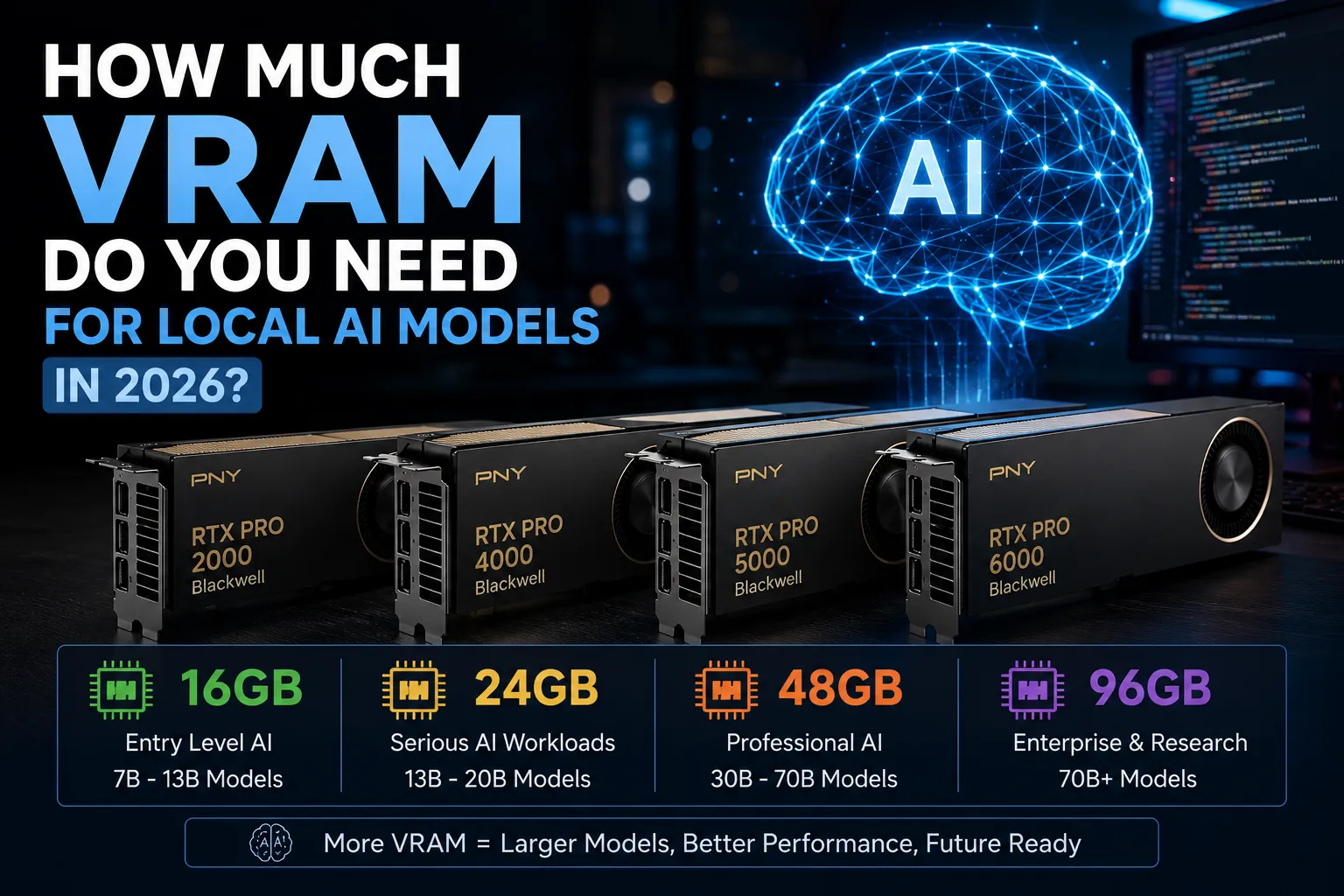
The biggest difference between these two GPUs is memory capacity. While both deliver excellent AI performance, the RTX PRO 5000 offers double the VRAM, making it better suited for larger AI workloads.
Why VRAM Matters More Than GPU Speed
When running AI models locally, VRAM is often more important than raw GPU performance.
Higher VRAM allows you to:
-
Run larger language models
-
Use larger context windows
-
Generate higher-resolution AI images
-
Handle multiple AI applications simultaneously
-
Improve overall AI workflow efficiency
If your model requires more memory than your GPU has available, performance drops significantly because the workload spills into system RAM.
For AI workloads, buying more VRAM today often means fewer hardware upgrades in the future.
RTX PRO 4000 Blackwell
The RTX PRO 4000 Blackwell is designed for developers and professionals who need reliable AI performance without investing in flagship workstation hardware.
Recommended For
-
AI Developers
-
Software Engineers
-
Local LLMs
-
Ollama
-
LM Studio
-
Stable Diffusion
-
ComfyUI
-
AI Coding Assistants
-
RAG Applications
Advantages
-
24GB ECC GDDR7 Memory
-
Professional NVIDIA Drivers
-
Excellent price-to-performance ratio
-
Lower power consumption
-
Perfect for dedicated AI workstations
For many AI developers, the RTX PRO 4000 Blackwell provides everything needed for daily AI development.
RTX PRO 5000 Blackwell
The RTX PRO 5000 Blackwell is designed for professionals running larger AI workloads.
With 48GB of ECC GDDR7 memory, it offers significantly more flexibility for demanding AI applications.
Recommended For
-
AI Startups
-
AI Consultants
-
Research Teams
-
Production AI Systems
-
Enterprise AI Deployments
-
Multi-user AI Platforms
Advantages
-
Massive 48GB ECC GDDR7 Memory
-
Better future-proofing
-
Larger AI models
-
Multi-user AI workloads
-
Enterprise reliability
If AI is becoming a major part of your business, the RTX PRO 5000 offers greater long-term value.
Ollama Performance
Both GPUs work exceptionally well with Ollama.
RTX PRO 4000 Blackwell
Suitable for:
-
7B Models
-
13B Models
-
Quantized 32B Models
-
Daily AI Development
RTX PRO 5000 Blackwell
Better suited for:
-
Larger Quantized Models
-
Longer Context Windows
-
Multiple AI Sessions
-
Future AI Models
If your workload grows over time, the additional VRAM provides much greater flexibility.
LM Studio Performance
Both GPUs deliver excellent performance with LM Studio.
However, the RTX PRO 5000 offers more headroom when working with larger language models, longer conversations and future AI releases.
Stable Diffusion & ComfyUI
If you work with AI image generation, both GPUs provide professional-grade performance.
The RTX PRO 4000 Blackwell is ideal for:
-
Stable Diffusion XL
-
ComfyUI
-
Flux Models
-
Daily AI image generation
The RTX PRO 5000 Blackwell provides additional advantages for:
-
Higher batch sizes
-
Larger image resolutions
-
Complex ComfyUI workflows
-
Multiple ControlNet pipelines
Future-Proofing Your AI Workstation
AI models continue to grow larger every year.
While 24GB VRAM is sufficient for many AI workloads today, 48GB provides considerably more flexibility for future models.
If you plan to use your workstation for the next three to five years, investing in additional VRAM can extend the useful life of your hardware.
Which GPU Should You Buy?
Choose RTX PRO 4000 Blackwell if you:
-
Build AI applications
-
Use Ollama daily
-
Work with LM Studio
-
Generate AI images
-
Want the best value for money
-
Need a professional AI workstation
Choose RTX PRO 5000 Blackwell if you:
-
Run larger AI models
-
Build commercial AI products
-
Support multiple AI users
-
Need better long-term scalability
-
Want maximum flexibility
RTX PRO 4000 vs RTX PRO 5000: Quick Comparison
| Feature | RTX PRO 4000 | RTX PRO 5000 |
|---|---|---|
| VRAM | 24GB | 48GB |
| AI Development | Excellent | Excellent |
| Local LLMs | Excellent | Excellent |
| Stable Diffusion | Excellent | Excellent |
| Large AI Models | Good | Outstanding |
| Enterprise AI | Good | Excellent |
| Future Proofing | Very Good | Outstanding |
Final Verdict
Both the RTX PRO 4000 Blackwell and RTX PRO 5000 Blackwell are outstanding workstation GPUs built for professional AI workloads.
If you're an individual developer, AI engineer or small business looking for the best balance between performance and cost, the RTX PRO 4000 Blackwell is an excellent choice.
If your workloads involve larger AI models, enterprise deployments or long-term AI infrastructure planning, the RTX PRO 5000 Blackwell is the better investment thanks to its 48GB of ECC GDDR7 memory.
Instead of asking which GPU is better, the real question is which GPU best matches your AI workflow, business requirements and future growth plans.